Canary
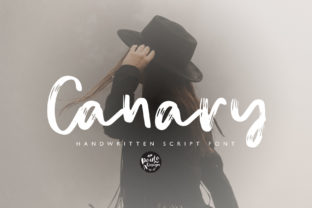
Canary is a handwritten brush font—fluid, expressive, and full of organic energy. It’s not a sterile digital script or an over-polished calligraphy clone. Instead, it captures the subtle pressure variations, ink bleed, and natural rhythm of real brushwork. That’s why designers, marketers, educators, and small business owners reach for Canary when they need headlines that stop scrolling, invitations that feel personal, or blog headers that convey warmth without sacrificing impact.
Why people choose Canary—and what they often overlook
Most users discover Canary because it “feels right” at first glance: bold enough for banners, friendly enough for newsletters, versatile enough for social graphics. But attraction alone doesn’t guarantee good results. Too many creators download Canary, drop it into a project, and assume the font will do the heavy lifting—only to find their headline looks muddy on mobile, their invitation feels inconsistent in print, or their branding loses cohesion across platforms.
Mistake #1: Using Canary for body text or long paragraphs
Canary is designed for emphasis—not endurance. Its high-contrast strokes, variable width, and connected letterforms create visual interest at size—but reduce readability below ~24px, especially in dense blocks. When used for blog body copy or email newsletters, readers strain to decode letters like “a,” “e,” and “s,” which rely on context and spacing to distinguish themselves.
Better approach: Reserve Canary for short, high-impact uses—hero section headlines, section dividers, event titles, or pull quotes. Pair it with a clean, highly legible sans-serif (like Inter, Lato, or Open Sans) for all supporting text. This contrast reinforces hierarchy and keeps communication clear.
Mistake #2: Ignoring weight and spacing adjustments
Unlike system fonts or even many variable fonts, Canary comes in a single weight and style. That means you can’t lighten or tighten it on the fly. Some users try to compensate by manually adjusting letter-spacing (tracking) or line-height—often over-correcting. Too much tracking makes words look disconnected; too little creates visual clutter, especially with lowercase “g,” “y,” and “j.”
Better approach: Test Canary at your intended size *before* finalizing layout. Use optical spacing—not uniform values. For example: set tracking to +20–+40 for 48px headlines on web, but reduce it to +5–+15 for 36px print invitations. Always preview on both screen and paper. If spacing feels off, scale the font slightly rather than forcing tracking corrections.
Mistake #3: Assuming it works everywhere—without checking licensing or tech support
Canary is a premium handwritten brush font, not a free Google Font. That means its use depends on proper licensing. A common misstep? Using the trial version for a client website or Shopify store launch—then discovering mid-project that web embedding requires a separate license, or that the desktop license doesn’t cover SVG exports for social media kits.
Better approach: Before downloading or purchasing, ask three questions: Where will this live? (Web, app, print, video?) How many users or domains are involved? Will it be embedded, converted to outlines, or exported as assets? Match those answers to the foundry’s license tiers. Reputable sellers clearly list usage rights—look for terms like “web font hosting,” “desktop installation,” and “commercial use.” If details are vague or missing, pause and contact support. It’s faster than redesigning after a cease-and-desist notice.
Mistake #4: Skipping kerning pairs and alternate characters
Canary includes thoughtful kerning—especially for common problematic pairs like “To,” “Va,” “We,” and “Fr.” But many design tools (especially basic editors or CMS page builders) ignore custom kerning by default. The result? Awkward gaps or collisions that undermine the font’s handcrafted feel.
Better approach: In professional tools like Adobe Illustrator or Figma, enable “Optical Kerning” or manually adjust problem pairs using the glyph panel. For Canva or Squarespace, convert Canary text to outlines *after* finalizing wording—this preserves spacing and avoids rendering inconsistencies. Also explore Canary’s stylistic alternates: some versions include swash capitals or contextual ligatures. Try “A” and “T” together—you’ll often see a more graceful connection when alternates are active.
What to check before using Canary in your next project
- Contrast & background: Canary relies on strong contrast. Avoid light gray text on white, or thin strokes on busy photos. Use solid backgrounds, subtle textures, or generous padding to let the brushwork breathe.
- File format compatibility: If you’re sending files to a printer or collaborator, confirm they can open .OTF files—or export as outlined vector shapes. Not all systems handle brush fonts reliably in native PDFs.
- Brand alignment: Does Canary reflect your voice? A fintech startup promoting security might find its looseness at odds with trust signals—while a pottery studio or wellness coach gains instant authenticity. Ask: Does this font help people understand who I am—or make them pause to figure me out?
- Load performance (for web): Brush fonts like Canary tend to be larger in file size. If self-hosting, compress the WOFF2 version and limit it to critical headings only—don’t load it for every paragraph or button label.
A realistic example: Fixing a common invitation mistake
Say you’re designing a wedding invitation using Canary for the couple’s names and date. You set the names at 60px, center-aligned, and add a soft shadow for depth. But when printed, the shadow blurs the delicate upstrokes—and the “&” symbol looks cramped between two wide letters.
Instead: remove the shadow entirely. Increase tracking by +30, then manually nudge the “&” 5px right for visual balance. Print a test strip on the same paper stock you’ll use for the final run. You’ll see the difference immediately—not just in polish, but in how the invitation feels: intentional, considered, human.
Final note: Canary rewards attention
This isn’t a font you toss in and forget. It asks for care—like selecting quality paper, choosing the right pen, or editing a spoken sentence before hitting record. When used thoughtfully, Canary adds personality without sacrificing professionalism. It helps educators connect with students, freelancers stand out in crowded feeds, and small businesses signal craft over convenience.
If you’ve tried Canary before and felt it didn’t land—chances are it wasn’t the font. It was timing, sizing, pairing, or permissions. Try again, but slower. Zoom in. Print it. Rotate the screen. Let the brushwork guide you—not the other way around.