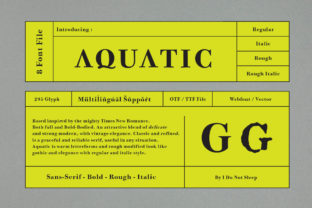
Aquatic Font: Bold, Elegant & Uniquely Modern
If you've ever scrolled past a website, social post, or product label and paused—just for a second—because the typography felt refreshingly confident yet graceful, there’s a good chance Aquatic was at work. It’s not just another display font. Aquatic is a thoughtfully crafted typeface that balances strong visual presence with refined simplicity—a rare pairing that makes it instantly useful across many real-world projects.
What Makes Aquatic Stand Out?
Aquatic isn’t built for body text or long paragraphs. Instead, it shines where first impressions matter: headlines, logos, posters, packaging, and digital banners. Its letterforms combine clean geometry with subtle organic curves—think crisp uppercase “A”s with gentle tapering strokes, or lowercase “g”s with soft, open counters. The contrast between thick and thin lines is intentional but never extreme, giving Aquatic both authority and approachability.
Unlike many modern fonts that lean heavily into minimalism or retro revival, Aquatic feels contemporary without being trend-dependent. It doesn’t shout—it commands attention with quiet confidence. That duality is why designers, marketers, and small business owners keep returning to it when they need something memorable but not overwhelming.
Where You’ll Actually Use Aquatic (and Why It Fits)
Let’s talk about real use—not theoretical ones. If you run a wellness studio, Aquatic adds calm strength to your class schedule posters or Instagram story highlights. Its elegance supports serenity; its boldness conveys professionalism. A freelance photographer might use it for their portfolio site’s hero headline—pairing it with a neutral sans-serif for body text creates instant visual hierarchy and personality.
Educators crafting workshop handouts or presentation slides find Aquatic helpful for section titles—students notice them, remember them, and associate them with clarity. Bloggers writing about travel, design, or sustainable living often choose Aquatic for featured quote graphics because it gives weight to ideas without feeling stiff or corporate.
Small retailers love it for product tags and seasonal signage. Imagine a ceramicist’s new mug line: “Sea Clay Collection” set in Aquatic on a kraft paper tag—bold enough to stand out on a crowded shelf, elegant enough to reflect craftsmanship. Or a café using it for their chalkboard menu header: modern, legible from across the room, and warm—not cold or sterile.
Who Benefits Most—and How
You don’t need design training to benefit from Aquatic. Beginners appreciate how easy it is to pair—try it with Open Sans, Inter, or even Georgia for contrast that feels natural, not forced. Casual users enjoy its plug-and-play versatility: upload it to Canva, select it in Figma, or activate it in Adobe Fonts, and start experimenting right away.
Professionals value its licensing flexibility. Most versions include web, desktop, and app usage rights—so whether you're building a client’s Shopify homepage or designing an internal training deck, you’re covered. Freelancers especially like how Aquatic helps differentiate their brand identity without needing custom lettering.
Entrepreneurs launching a new service or product find Aquatic effective for conveying both innovation and trust. It reads as forward-thinking but grounded—ideal for fintech tools, eco-conscious brands, or boutique coaching businesses trying to signal competence *and* care.
Simple Pairing Tips for Better Results
- Contrast matters: Pair Aquatic with a highly legible, neutral sans-serif for body copy—avoid other decorative fonts nearby.
- Size with intention: At large sizes (48px+), Aquatic’s details sing. Below 24px, it loses impact—stick to headings and short labels.
- Whitespace is your friend: Give letters breathing room. Tight tracking can dull its elegance; generous line height keeps it airy and readable.
- Color wisely: Deep navy, charcoal, or forest green deepen its sophistication. Avoid overly bright neons unless irony or energy is the goal.
Things to Keep in Mind Before You Commit
Aquatic excels in specific roles—but knowing its limits helps you use it well. It’s not ideal for mobile app navigation menus, email subject lines, or legal disclaimers. Those need speed, scalability, and universal rendering—areas where system fonts still lead.
Licensing varies by source. Some free versions are limited to personal use only; others require attribution. Always check the license before using Aquatic commercially—even if it’s “free to download,” commercial rights aren’t automatic. Reputable sources like Google Fonts (if available), Adobe Fonts, or trusted foundries provide clear terms.
Also consider your audience’s context. If your project targets older adults or people with low vision, test readability carefully. While Aquatic is clear at appropriate sizes, its stylistic details mean it shouldn’t replace accessibility-first fonts in critical UI elements.
Getting Started Is Simpler Than You Think
You don’t need expensive software to try Aquatic. Many platforms support it natively—or let you upload custom fonts easily. In Canva, search “Aquatic” in the font menu (if licensed through their library). In WordPress, plugins like Custom Fonts make installation straightforward. For developers, linking via @import or self-hosting the WOFF2 file works smoothly with modern browsers.
Start small: redesign one social media graphic. Swap your current headline font for Aquatic, adjust spacing, and compare. Notice how tone shifts—not dramatically, but meaningfully. That’s the power of intentional typography.
Remember, great design isn’t about chasing every new font—it’s about choosing the right tool for what you’re communicating. Aquatic stands out because it meets real needs: clarity with character, modernity with warmth, distinction without distraction. Whether you're naming a podcast, launching a newsletter, or refreshing your business cards, it offers a reliable way to say something memorable—without saying too much.