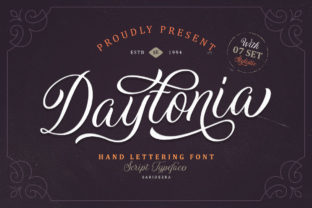
Daytonia: A Handmade Script Font for Purpose-Driven Design
Daytonia is a handmade script font—crafted with intention, not algorithm. Its letters carry the subtle irregularities of human touch: slight variations in stroke weight, organic entry and exit strokes, and natural rhythm across words. That authenticity isn’t decorative—it’s functional. When you choose Daytonia, you’re not just selecting a typeface; you’re choosing a tool that supports clarity of voice, consistency of brand expression, and efficiency in execution.
Where Daytonia Fits in Real Workflows
Fonts don’t exist in isolation—they’re embedded in processes. Daytonia enters workflows where personality matters but precision can’t be compromised. Think of it as the quiet collaborator in your design pipeline: present early enough to shape tone, flexible enough to adapt mid-project, and durable enough to scale across touchpoints without losing character.
For a small business owner launching a new product line, Daytonia might appear first in mood boards and brand guidelines—not as decoration, but as a decision anchor. Its warmth signals approachability; its structure ensures legibility at small sizes on tags or packaging. Later, it moves into mockups, then final assets—logos, social banners, email headers—without requiring redesign or substitution. That continuity saves time and reinforces recognition.
Integration Before, During, and After Creation
Before creation: Daytonia works well in discovery phases. When brainstorming brand names or taglines, typing them in Daytonia helps surface whether a phrase *feels* right—not just sounds right. Its handwritten quality makes abstract concepts tactile. Designers often use it alongside sketching tools or Figma wireframes to test hierarchy before committing to vector paths.
During creation: It integrates cleanly into standard design environments. Daytonia supports OpenType features like ligatures and contextual alternates—so “Th” or “st” pairs flow naturally without manual adjustment. That means less time finessing spacing, more time refining messaging or layout. For apparel designers, it holds up well on screen-printed tees because its thick-to-thin contrast translates reliably across fabric textures and print resolutions.
After creation: Daytonia scales predictably. Once locked into a logo or wordmark, it remains consistent across digital ads, PDF pitch decks, and printed signage. Unlike some script fonts that blur or pixelate at small sizes, Daytonia’s optimized outlines maintain integrity down to 14px in interface elements—useful for app onboarding screens or dashboard labels where brand voice still matters.
Compatibility and Technical Readiness
Daytonia is delivered in OTF and TTF formats, compatible with Adobe Creative Cloud (Illustrator, Photoshop, InDesign), Affinity apps, Figma, Canva Pro, and most desktop publishing software. No plugins or converters needed. On web projects, it can be self-hosted via @font-face or licensed through platforms like Adobe Fonts—ensuring consistent rendering across browsers and devices.
It’s not a variable font, so weight or width adjustments require separate files—but that limitation encourages intentionality. You decide upfront whether “light,” “regular,” or “bold” best serves the context, rather than defaulting to sliders that dilute typographic voice.
Practical Implementation Tips
- Pair deliberately: Use Daytonia for headlines, names, or short statements—and pair it with a neutral sans-serif (like Inter, Lato, or Montserrat) for body copy. This creates contrast without competition. Avoid other scripts or overly decorative fonts nearby; Daytonia carries enough presence on its own.
- Test spacing early: Kerning is built in, but always preview full phrases—not just “A B C.” Words with repeated tall letters (e.g., “coffee,” “beautiful”) benefit from manual tracking tweaks in Illustrator or tighter letter-spacing values in CSS.
- Leverage its versatility across mediums: It works in embroidery digitizing (clean curves translate well to stitch paths), vinyl cutting (smooth outlines cut cleanly), and even chalkboard-style digital illustrations (its texture complements hand-drawn elements).
- Consider licensing scope: The standard license covers desktop and web use for one domain or business entity. If you’re a freelancer using Daytonia across client projects, verify whether your usage falls under the multi-client or extended license—this avoids rework later when deliverables go live.
Consistency Without Compromise
Maintaining visual consistency isn’t about rigid repetition—it’s about applying principles with flexibility. With Daytonia, that means defining clear usage rules early: where it appears (logos only? headlines only?), size ranges (minimum 18pt for print, 24px for web), and color constraints (solid dark tones work best; avoid low-contrast combinations like light gray on white).
These aren’t restrictions—they’re guardrails. They prevent drift across team members, agencies, or platforms. A marketer handing off assets to a developer knows exactly how Daytonia should render in HTML. An educator designing workshop handouts knows which weights are legible when photocopied. That predictability compounds over time, reducing revision cycles and reinforcing trust in the brand’s execution.
Long-Term Use and Evolution
Daytonia doesn’t chase trends. Its handmade foundation gives it staying power—not because it’s timeless in a generic sense, but because it reflects a specific, human-centered approach to communication. As your business grows, Daytonia adapts without needing reinvention. A startup using it for its first website can continue using it five years later on investor decks, merch lines, or physical storefront signage—no rebrand required.
That longevity depends on disciplined application. One useful habit: create a lightweight style guide snippet just for Daytonia—two sample phrases, three approved pairings, and one “avoid” example (e.g., all-caps usage, which flattens its rhythm). Store it in your shared drive or Notion workspace. Update it only when real-world testing reveals a gap—not on speculation.
Workflow Integration Beyond Design
Daytonia extends beyond visual design teams. Educators use it in printable worksheets to soften academic tone without sacrificing readability. Bloggers apply it to newsletter headers to distinguish their voice amid algorithm-driven feeds. Freelancers embed it in proposal templates to signal craft and care before the first meeting. Even productivity-focused users apply it selectively in Notion page titles or habit trackers—small doses of intentionality that reinforce focus.
The key is alignment: does Daytonia serve the goal, or distract from it? If you’re building a luxury skincare brand, its elegance supports perceived value. If you’re labeling industrial equipment manuals, it likely doesn’t belong. That discernment—grounded in purpose, not preference—is what separates effective implementation from aesthetic dabbling.
Ultimately, Daytonia earns its place not by being everywhere, but by being *right* where it’s used. It doesn’t replace strategy—it clarifies it. It doesn’t automate creativity—it frames it. And for professionals who move between planning, making, and shipping daily, that kind of reliable, human-scaled tooling is rare—and worth integrating with care.