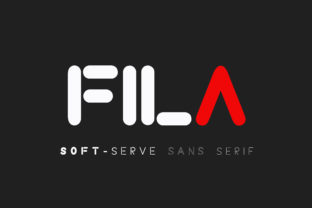
Fila
Fila is a minimal and modern sans serif font with a unique charm—clean lines, balanced proportions, and just enough character to stand out without shouting. It’s not flashy, but it’s confident. Designers, marketers, educators, and small business owners reach for Fila when they want clarity paired with quiet distinction: a logo that feels intentional, a presentation that breathes, a blog post that invites reading—not skimming.
What Fila actually is (and what it isn’t)
Fila isn’t a system font like Arial or Helvetica. It’s a carefully crafted display and text face—designed for both screen and print—with thoughtful spacing, open apertures, and consistent stroke contrast. Its “bold twist” comes not from exaggerated weight or ornamentation, but from subtle design decisions: the gentle curve of its lowercase a, the clean termination of its uppercase I, the even rhythm across letterforms. That means it works well at 14px in body copy—and equally well at 60px on a hero banner.
But here’s where confusion often starts: some assume Fila is “just another free Google Font.” It’s not. While it’s available through reputable foundries and licensing platforms, it’s not part of the standard Google Fonts library. That matters—not because it’s inaccessible, but because it signals intentionality. You’re choosing a typeface with documented design rigor, not one optimized for universal web delivery first and aesthetic coherence second.
Mistake #1: Using Fila without checking licensing for your use case
Fila comes with distinct licenses—web, desktop, app, and extended. A freelance designer might buy a desktop license for client branding work, only to later realize their client needs to embed Fila in a mobile app. That requires a separate app license. Skipping this step doesn’t just risk legal exposure—it can delay launches, force last-minute font swaps, and dilute brand consistency.
Better approach: Before downloading or purchasing, ask: “Where will this live?” If it’s going into an email newsletter, a Shopify store, a PDF report, or a SaaS dashboard, verify the license covers that environment. Reputable vendors list permitted uses clearly—look for terms like “SaaS embedding,” “digital ad usage,” or “unlimited pageviews.” When in doubt, contact the foundry directly. Most respond within 24 hours.
Mistake #2: Pairing Fila with fonts that compete instead of complement
Fila’s minimalism makes it versatile—but not infinitely flexible. Pairing it with another geometric sans (like Montserrat or Poppins) often creates visual redundancy: similar x-heights, similar terminals, similar neutrality. The result? A layout that feels flat, unstructured, or unintentionally monotonous.
Better approach: Lean into contrast. Try Fila for headlines paired with a warm, humanist serif like Lora or Merriweather for body text. Or use it alongside a restrained mono-spaced font (e.g., IBM Plex Mono) for code snippets or data labels. The goal isn’t “matching”—it’s establishing clear visual hierarchy and tonal balance. Test it: set a headline in Fila Bold and paragraph text in your candidate pairing at actual size, on the device you’ll be designing for.
Mistake #3: Assuming “light” or “thin” weights are safe for body text
Fila’s Light and Thin weights are elegant—ideal for captions, pull quotes, or delicate interface elements. But they’re not built for extended reading at small sizes or on low-resolution screens. On older laptops or budget smartphones, those fine strokes can blur, fade, or disappear entirely—especially against light backgrounds.
Better approach: Reserve Light/Thin for large-scale, high-contrast applications only. For body copy, stick to Regular or Medium. And always test readability: paste a full paragraph into your design tool, zoom to 100%, and view it on a real device—not just your high-end monitor. If letters feel fragile or hard to track, step up one weight.
Mistake #4: Overlooking optical sizing and variable axis support
Fila is available in both static weights and as a variable font (with axes for weight and width). Some designers download only the static files—missing out on smoother responsive scaling, smaller file sizes, and more nuanced control. Others assume variable = automatic optimization, then apply extreme width or weight values without testing legibility at extremes.
Better approach: If you’re building for the web and control your CSS, use the variable version. It reduces HTTP requests and allows fluid adjustments (e.g., slightly narrower Fila at mobile breakpoints). But don’t push the width axis beyond 95% or below 85% without testing—extreme condensation breaks word recognition. Likewise, avoid weight values above 750 unless you’re using it for large-format signage or bold visual accents.
What to check before you commit
- Language support: Does the version you’re evaluating include diacritics for Spanish, French, Vietnamese, or other languages your audience uses? Missing glyphs mean fallback fonts—and inconsistent typography.
- Hinting & rendering: Especially for desktop use, check if the font includes robust hinting for Windows ClearType. Poorly hinted fonts look fuzzy or uneven on older Windows machines—a common oversight for Mac-first designers.
- Character set completeness: Look for OpenType features like ligatures, small caps, and true fractions. Fila includes many—but not all versions do. If you need stylistic alternates for branding, confirm they’re included in your license tier.
- Foundry reputation: Download only from official sources—like the original foundry’s site or trusted platforms such as MyFonts or Adobe Fonts. Third-party “free download” sites often serve outdated, modified, or malware-laced files.
A final note on intention
Choosing Fila isn’t about chasing trendiness—it’s about aligning your typography with purpose. Its strength lies in restraint: no unnecessary flourishes, no forced personality, just honest form meeting function. That makes it especially valuable for educators crafting accessible slides, entrepreneurs building trustworthy websites, or bloggers who want readers to focus on ideas—not font gymnastics.
So before you drop it into your next project, pause and ask: Does this choice serve the message—or just fill space? If the answer is clear, Fila will do the rest quietly, confidently, and well.