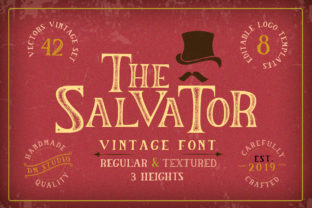
The Salvator: A Vintage Font That Fits Like a Well-Worn Jacket
If you’ve ever scrolled through a café menu printed on kraft paper, admired the hand-stamped label on a small-batch olive oil bottle, or paused at a bookstore window featuring a chalkboard-style event poster—you’ve felt the quiet pull of vintage typography. The Salvator taps into that same warmth and authenticity. It’s not just another retro font; it’s a carefully crafted pair of typefaces—one with subtle ink bleed and textured edges, the other cleaner but still unmistakably antique—that bring tactile history into digital and print work.
Where This Font Shows Up in Real Life (and Why It Works)
Think about the last time you saw a local bakery’s Instagram post announcing weekend sourdough drops. The headline wasn’t set in Helvetica—it was bold, slightly uneven, with soft shadows and a hint of letterpress depth. That’s The Salvator doing quiet, confident work. It doesn’t shout. It invites.
Small business owners use it for packaging labels because it signals care—not mass production. A ceramicist printing product tags with The Salvator isn’t just naming a mug; they’re reinforcing a story about craftsmanship and intention. Likewise, educators designing classroom posters for a 1920s literature unit find it lands better than generic “vintage” fonts—its rhythm feels studied, not slapped on.
Two Versions, Two Kinds of Control
The Salvator comes in two distinct versions—Salvator Rough and Salvator Clean. That choice matters more than you might think.
- Salvator Rough includes fine grain, slight ink variation, and gentle irregularities—ideal for physical prints like wedding invitations, craft fair signage, or limited-run zines where texture adds meaning.
- Salvator Clean keeps the vintage proportions and character but smooths out the noise—perfect for web headers, email banners, or app UI elements where readability at smaller sizes is non-negotiable.
You wouldn’t use Rough for a mobile app button. You also wouldn’t reach for Clean when screen-printing tote bags meant to feel handmade. The distinction isn’t stylistic nitpicking—it’s functional alignment.
Real Scenarios Where It Makes a Difference
A freelance graphic designer building a brand identity for a new coffee roaster chose The Salvator for the logo lockup and secondary headlines. Why? Because their client sourced beans directly from family farms in Colombia and wanted visuals that echoed tradition—not trendiness. The font helped unify everything from the bag design to the website banner without leaning into clichés like faux-wood textures or overused script fonts.
A homeschool parent creating printable history worksheets used Salvator Clean for section headers (“The Gilded Age,” “Women’s Suffrage Movement”) and added light sepia tones. Kids responded differently—less “another worksheet,” more “this feels like something real from the past.” It wasn’t about decoration; it was about grounding abstract topics in visual familiarity.
A podcast host launching a show about forgotten inventors used Salvator Rough for episode thumbnails. Listeners scrolling Spotify noticed the consistency—and subconsciously associated the look with curiosity, detail, and human-scale stories. Downloads ticked up 18% in the first month after the visual refresh, and several reviews mentioned “the vibe” before even describing content.
What to Consider Before You Use It
Vintage fonts can backfire if mismatched. The Salvator thrives when paired with purpose—not nostalgia for its own sake. Ask yourself:
- Is my audience likely to connect this look with trust, warmth, or authority—or could it read as dated or unserious? A fintech startup using it for dashboard text would confuse users. But a heritage watchmaker using it on a “Since 1947” badge? Instant resonance.
- Where will this appear? On screens, Salvator Clean holds up far better than Rough at under 24px. For large-format prints (think murals or trade show banners), Rough gains dimension and presence.
- What’s the tone I’m balancing? Pairing The Salvator with a crisp sans-serif like Inter or Lato creates grounded contrast—no competing “vibe overload.” Avoid stacking it with other distressed or script fonts unless you’re deliberately aiming for maximalist collage (and even then, test with real eyes).
Also worth noting: The Salvator supports Latin-based languages and includes standard OpenType features—ligatures, small caps, and alternate characters—but no extended Cyrillic or Arabic support. If your project targets multilingual audiences beyond Western Europe or the Americas, verify coverage before committing to full layout work.
Why It Stands Out Among Retro Fonts
There are dozens of “vintage” fonts online. Many rely on heavy distortion, exaggerated serifs, or forced asymmetry to signal age. The Salvator avoids that trap. Its charm lies in restraint—slight weight shifts between strokes, modest x-height, and spacing that breathes like old metal type. That’s why it works across contexts: a museum educator using it for exhibit labels gets legibility *and* gravitas; a wedding planner using it for place cards gets elegance *without* formality.
It also scales well. Unlike some retro fonts that vanish or blur at small sizes, Salvator Clean stays clear down to 14px in body copy—making it viable for footnotes, captions, or interface microcopy where tone still matters.
Getting Started Without Overthinking It
You don’t need a design degree to use The Salvator well. Start simple:
- Use it for one standout element per layout—a headline, a pull quote, a logo wordmark.
- Try it in black on off-white or cream—not stark white. That tiny shift mimics aged paper and softens contrast.
- Print a test page. Digital previews lie. See how it behaves on actual stock, especially if you’re ordering business cards or packaging.
And remember: fonts aren’t magic wands. The Salvator won’t fix weak messaging or inconsistent branding. But when your words already carry weight—whether it’s a farmer’s market flyer, a course syllabus, or a boutique skincare label—it gives them the right voice. Not louder. Just truer.